A standard 30-centimeter ruler (approximately 12 inches) has been the cornerstone of student pencil cases and engineering workbenches for centuries. However, displaying a genuine 30 cm ruler on modern portable displays presents a physical paradox: The average smartphone screen is only 14 to 16 centimeters tall, and compact laptop screens rarely exceed 25 centimeters in vertical height. Here is how modern interactive web rulers solve this challenge and enable accurate vertical and long-span measurements.
1. The Challenge of Displaying 30 cm on Portable Screens
When an online ruler attempts to force 30 centimeters of graduation marks onto a phone display that is physically only 15 cm long, it must compress the scale. If it compresses the scale, 1 centimeter on the screen no longer equals 1 centimeter in reality, entirely destroying the 1:1 true-scale property.
Traditional static websites either shrink the ruler marks or crop the ruler abruptly at the screen edge. Neither compromise is acceptable for precision work. To measure extended objects accurately on compact screens, a virtual ruler must maintain genuine 1:1 physical calibration while allowing fluid navigation across the entire 30-centimeter measurement range.
2. How the Interactive 30 cm Scrollable Scale Works
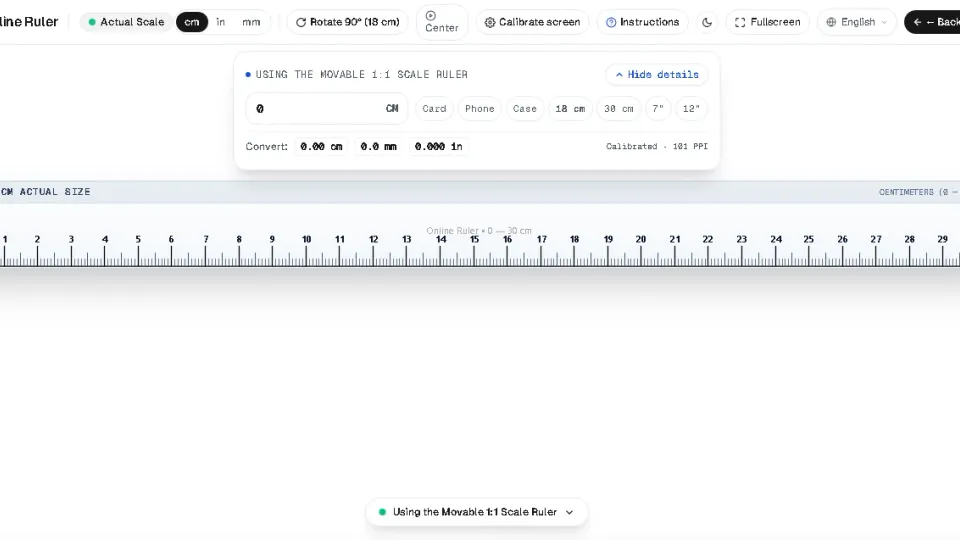
Our Movable Scrollable Scale introduces an interactive canvas-based sliding tape mechanism. Instead of locking the ruler to the viewport dimensions, the ruler acts as an endless calibrated tape:
- Continuous Sliding: Touch and drag the ruler horizontally or use your mouse wheel to slide smoothly from 0 cm past 10 cm, 20 cm, up to 30 cm.
- Persistent Calibration: Every millimeter graduation maintains exact physical scale regardless of scroll position.
- Dual Metric & Imperial Reading: View centimeters and millimeters along the top edge while simultaneously reading 1/16-inch fractional markings along the bottom edge.
3. Vertical vs. Horizontal Rulers: When and How to Use Each
While horizontal measuring is standard for lay-flat desk objects, vertical (senkrecht) measurement is frequently necessary for specialized tasks:
| Orientation | Best Use Cases | Physical Advantage |
|---|---|---|
| Horizontal Ruler | Pens, cables, paper sheets, jewelry chains | Utilizes wider desktop aspect ratios (16:9 or 16:10) |
| Vertical Ruler (Senkrecht) | Bottles, plant cuttings, height checks, vertical bezel alignment | Utilizes portrait mobile orientation and side bezel fences |
Our online ruler supports multi-edge detection. You can measure along the top, bottom, left, or right edges of your display screen simply by selecting the active edge selector in the center toolbar.
4. Millimeter Precision: Tick Marks, Crosshairs, and Edge Detection
Reading millimeters on a high-DPI glass screen requires clean, high-contrast visual cues. On our Millimeter Ruler, lines are rendered with mathematical subpixel antialiasing:
- 10 mm Major Lines: Longest tick marks accompanied by high-contrast numeric labels indicating each whole centimeter.
- 5 mm Intermediate Lines: Medium-length tick marks designed for quick visual division of centimeters in half.
- 1 mm Minor Lines: Short, crisp graduation lines spaced at exactly 1.0 mm intervals for fine mechanical inspection.
- Interactive Crosshairs: Click or touch anywhere on the scale to deploy moveable crosshair guides. These hair-thin lines lock onto both ends of your workpiece, allowing you to read measurements without obscuring the graduation numbers.
5. Practical Applications: Hardware, Electronics, and Paper Formats
A 30 cm virtual scale is especially valuable across diverse everyday and professional scenarios:
- Fastener Sizing: Measure screw lengths (up to 120 mm) and bolt diameters instantly before ordering replacements online.
- Standard Document Verification: Verify standard paper dimensions—such as ISO A4 paper (210 × 297 mm) or US Letter (8.5 × 11.0 inches)—to ensure correct printer feeding.
- 3D Printing Calibration: Inspect prototype test prints and calibration cubes against the screen to verify dimensional shrinkage before final fabrication.
- Crafting & Sewing: Check ribbon lengths, button diameters, and seam margins without hunting for a sewing tape measure.
6. Zero-Gap Edge Alignment Technique
Traditional physical rulers often leave a blank gap of 2 mm to 5 mm between the zero mark and the physical plastic corner of the ruler. This "dead space" makes it frustrating to measure items starting right at an edge or inside a corner.
With our on-screen ruler, the zero mark can be mapped right against the outer bezel of your device. By butting your physical object against the raised edge of your laptop hinge or smartphone chassis, you achieve zero-gap reference alignment that outperforms many budget physical rulers.
7. Scrollable Screen Scale vs. Retractable Steel Tape Measure
Retractable steel tape measures are indispensable on construction sites, but they present noticeable drawbacks when measuring delicate or miniature objects. The curved concave profile of a metal tape blade prevents it from resting completely flat against small workpieces, and the stamped metal end hook introduces 0.5 mm to 1.0 mm of mechanical play designed for push-pull framing cuts.
In contrast, an on-screen scrollable scale offers an optically flat measuring plane with zero hook wiggle. For measuring flat stamps, semiconductor chips, leather crafts, and graphic design prints up to 30 cm, our virtual ruler provides superior edge contrast and repeatable millimeter precision right inside your browser window.